Crowdcut / Features
Everything Crowdcut does, said plainly.
It learns how you edit, clips live streams and anything already recorded, picks moments from how your audience reacted, gives you a real editor and writes the captions. Every clip waits for your approval.
Teach it to clip like you.
Give Crowdcut a clip whose edit you like and it works out how that clip was made: the framing, the caption look, the length, how fast it cuts and how its hooks are written. Then it applies that to a whole project or to a single clip.
From one reference clip
- Upload a file or paste a link. Crowdcut reads the first few minutes.
- Layout: whether it is a facecam crop, letterboxed or a blurred fill.
- Caption look: position, upper or normal case, text and highlight colours, highlight as colour or box, outline weight, size, words on screen and the hook treatment.
- Pacing: new clips run about as long as the reference. Several hard cuts a minute switches on silence cuts with a matching gap; a reference that plays straight switches them off.
- Hook voice: a two-sentence brief on how the channel writes on-screen text (slang or plain, case, punctuation, emoji), which the hook drafts follow.
- Save the result as a custom style, apply it to a project, or apply it to one clip and it re-renders.
From a clip and the stream it came from
- Paste a clip that did well and the VOD it was cut from. Twitch and YouTube clips bring their own timestamp; for anything else on a VOD over an hour, add roughly when it happened.
- Crowdcut finds exactly where the clip sits in the stream and compares the two versions of the same seconds.
- It measures how much setup the editor kept before the payoff, how long the clip runs after it, the jump cuts, any punch-in zoom, whether music or sound effects were added, the caption look and the speaking pace.
- Across all your pairs it builds one profile you can apply to a project, so every new render in that project is edited the same way.
Reference videos and custom saved styles are on Growth (up to 5 references) and Agency plans (unlimited).
What a reference sets
- layout
- facecam · letterbox · blurred fill
- captions
- position · case · colours · highlight · outline · size
- hook
- card, banner or pill · emoji on or off
- length
- about as long as the reference
- cuts
- jump cuts on or off, gap set by the cut rate
- voice
- a two-sentence brief for hook drafts
Clip live streams, VODs and uploads.
Clip a stream while it is still on, or anything that has already been recorded. Every clip lands in the same review queue, whichever way it came in.
Live clipping (beta)
- Add your Twitch channel to a project and leave it on. While you stream, Crowdcut reads your chat and cuts the moments it reacts to.
- Clips are cut from Twitch's own copy of the broadcast and reach your review queue a minute or two later, so you can post before the stream ends. Past broadcasts need to be switched on in your Twitch settings (they are on by default for Affiliates and Partners).
- Up to 4 clips an hour per channel, unless chat goes truly wild. Live clips count toward your plan's monthly clips like any other.
- On Creator (1 watched channel), Starter (up to 3), Growth (up to 10) and Agency plans.
- Kick needs a recording on our side, so ask us to turn it on for your channel. YouTube live is not in the beta yet; pasted YouTube streams still use their chat replay.
Links and uploads
- Paste a Twitch VOD or clip, a YouTube video or stream, a Kick VOD, a TikTok, or a direct .mp4 link. Several links at once are clipped as a series.
- Or upload the file from your computer.
- Long VODs are processed in 30-minute sections, so the first clips reach review while the rest of the stream is still being worked through.
- Choose how many clips you want and how long they should be, from 8 to 90 seconds.
Live clipping is a beta: Twitch channels today, Kick on request, YouTube live not yet.
Where clips come from
It reads the room.
Your viewers already told you which moments landed: they laughed, spammed the hype emotes or asked for the clip. Crowdcut reads that, plus what your community has been talking about, and uses it to pick moments and write hooks.
What chat tells it
- Chat speeding up past its own recent pace marks a moment. What people type says what kind it was.
- A window that is mostly reactions counts even when the message count is modest, so a small chat laughing is the same moment as a big chat laughing.
- People typing “CLIP IT” is the clearest vote and weighs the most.
- Pasted Twitch VODs and YouTube streams use their chat replay. Uploads and videos without chat fall back to spoken reactions and loudness.
- Every clip opens on the setup, not on the reaction.
What your channel tells it
- Each project has a brief: who the audience is, topics to prioritise, keywords to look for, and an avoid list. Topics rank higher; anything on the avoid list is skipped.
- Add community sources (a subreddit, Twitch channels, YouTube channels). Crowdcut reads the past week of top posts, the titles viewers gave their clips, and recent uploads, and uses that when it ranks moments and drafts hooks.
- Pull topics from YouTube's trending chart into the brief with one click.
- On watched channels, the clips your Twitch viewers make and the timestamps people leave in YouTube comments point to moments too.
What happened after you posted
- Results tracks views, likes, comments and shares on the clips you posted: from YouTube for public videos, from connected TikTok accounts, or typed in by hand.
- See which hooks, styles and posting hours pull views.
- Analytics shows followers, views and watch time across connected accounts.
What chat types, and what it means
- LaughingLUL · KEKW · LMAO · 💀
- HypePOG · LET'S GO · W · 🔥
- ShockWTF · NO WAY · BRUH · 😱
- Clip requestCLIP IT · clip that · !clip
A full video editor in the app.
Every clip opens on a timeline with four lanes. The style's first edit is already there, and every piece of it can be moved, changed or removed.
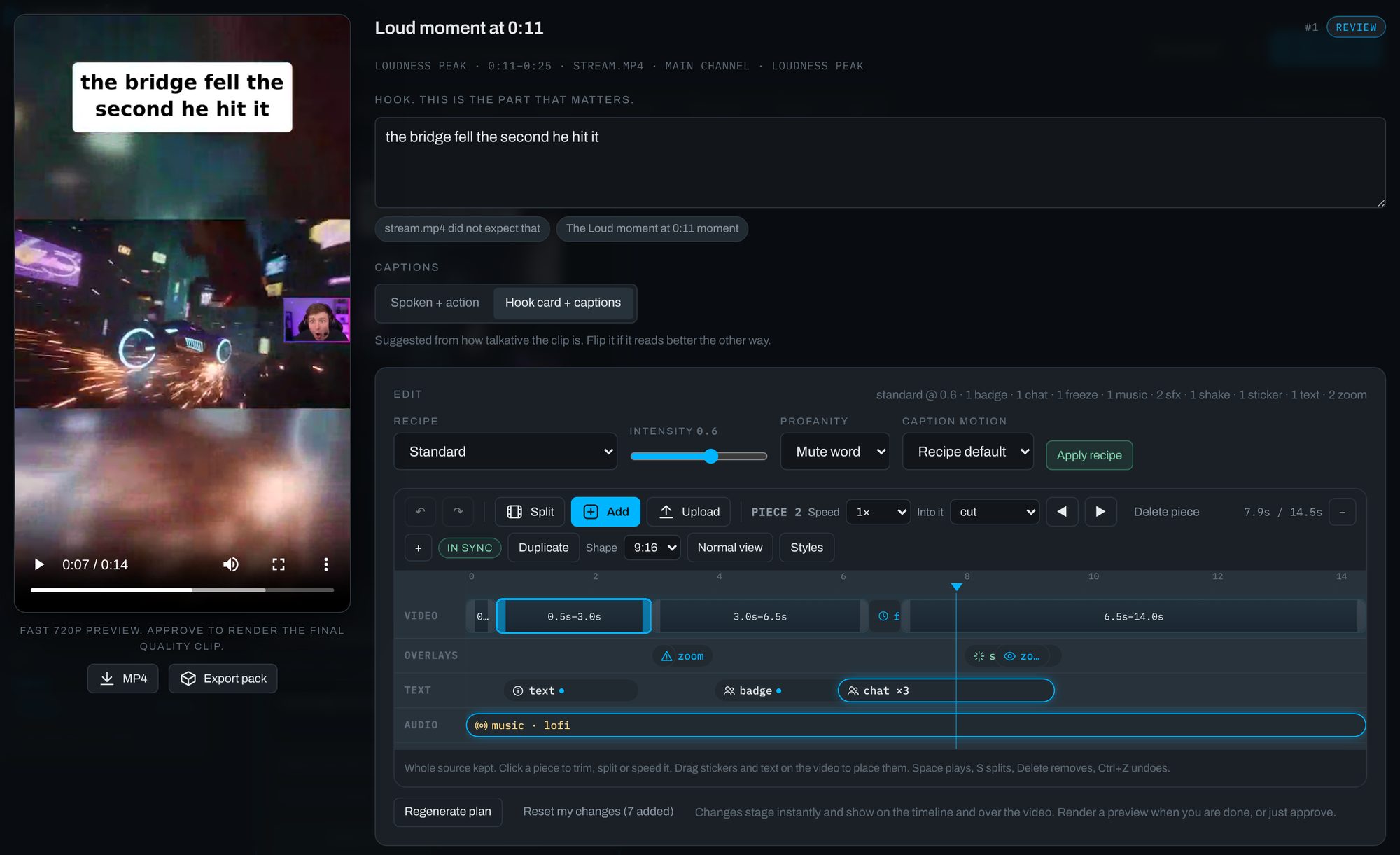
Video
- The pieces in the order they play: the main segments, a cold open, cutaways, replays, freeze frames and an end card.
- Drag the handles to trim, split at the playhead, delete a piece or drag it to a new spot.
- Set each piece's speed from 0.5× to 2× and pick the transition into it: fade, dissolve, wipes, slides and more.
Overlays and text
- Stickers from the built-in set or your own uploads, and picture-in-picture or full-frame cutaways from your library.
- Zooms on the facecam or the whole frame, shakes, and VHS, film or black-and-white filters.
- Text, badges and chat stacks. A chat stack is prefilled with what chat actually said when there is a chat log.
- Drag stickers, text, badges and picture-in-picture anywhere on the vertical frame; the render puts them exactly there.
Audio
- A music bed, voiceovers with the clip's own audio ducked under them, built-in or uploaded sound effects, and mutes.
Working with it
- Changes are staged as you go, with undo and redo.
- Render a fast 720p preview to check the cut; approving renders the final.
- Edits and re-renders of the same clip never count against your plan.
Captions and hooks that read right.
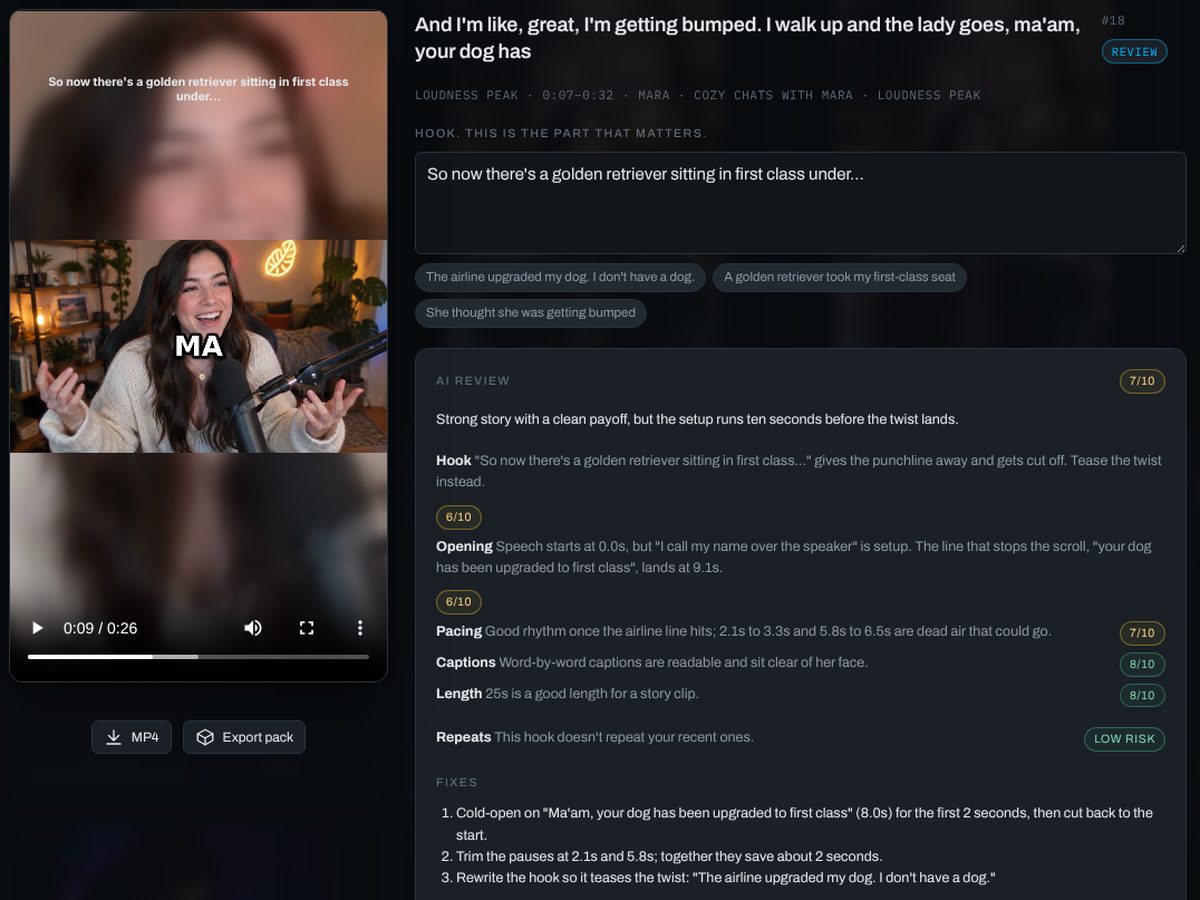
Captions are timed to each spoken word and laid out in phrases you can read in one glance. The hook on top is drafted for you from what was actually said.
Captions
- Every word is timed from the speech. The word being spoken is highlighted, as a colour or a box, depending on the style.
- Words are grouped into phrases that end at punctuation, at a pause or when the line is full. The punchiest styles flash one or two words at a time instead.
- Clips open on the start of a sentence, not mid-word, whenever the speech allows it.
- The caption language is detected automatically, or set it per project.
Hooks
- Three hook drafts per clip, written from the transcript and your brief (audience, voice, example hooks you like), plus what your community has been talking about when you add community sources.
- Pick one, edit it, or write your own. Emoji in hooks can be switched off.
Postable by default
- Swear words are starred in captions and the hook (f***, sh**) and muted in the audio. Matching is whole-word, so words like “class” and “assassin” are left alone.
- Add words to mask or never mask in the project brief, or switch masking off.
Styles
- 15 caption styles, switchable per project or per clip, or a style learned from a reference clip.
- Edit any caption word or the hook in review; the clip re-renders in seconds and re-renders are free.
Your audience already picked the clips.
Paste a stream or video link on the home page and get two clips free, no sign-up. Plans from $29/month, first month $14.50. Cancel anytime.